Most people only think about the current month’s electricity bill — until the day they suddenly need an old one. A tax filing asks for utility records. A landlord and tenant disagree over who owes which month. A property sale requires proof that no dues are pending. Or your latest bill looks suspiciously high and you want to compare it against the same month last year.
The good news: FESCO’s billing system keeps your last 12 months of bills available online, and you can view the complete history — month by month, with units consumed, billed amounts, and paid/unpaid status — in under a minute, free, using nothing but your reference number. This guide walks you through the exact process, teaches you how to actually read the history table (most people miss its most useful signals), shows how to download or print any old bill, and explains what to do when you need records older than 12 months.
Why You’d Need a Previous FESCO Bill (More Reasons Than You Think)
Old electricity bills are quietly one of the most-requested documents in Pakistani paperwork. The common scenarios:
Tax and business records. Filers claiming utility expenses, shopkeepers documenting business costs, and accountants closing yearly books all need month-wise utility records. The 12-month history is exactly the evidence trail they want.
Landlord–tenant settlements. When a tenant moves out mid-year, the paid/unpaid status of each month settles the “I already paid that month” argument in seconds, with official data instead of memory.
Property sale and transfer. Buyers routinely demand proof that no electricity dues are pending. A clean 12-month paid history is the fastest reassurance you can show.
Detecting billing errors. A sudden jump in units this July versus last July is the classic sign of a misread meter or a detection issue. You cannot spot the anomaly without the history in front of you.
Address and residence proof. Banks, embassies, and government offices frequently accept a recent utility bill as address proof — and sometimes ask for more than one month to establish continuous residence.
Solar and load planning. Before investing in solar panels, UPS capacity, or a load extension, you need your real seasonal consumption pattern — which is exactly what 12 months of unit data reveals.
Whatever brought you here, the process below covers it.
What the FESCO 12-Month Bill History Actually Shows
When you pull up your bill online, the record includes a bill history section covering the last 12 billing months. For each month you can see:
| Column | What It Tells You |
|---|---|
| Billing month | Which month’s bill the row represents |
| Units consumed | Electricity used that month (kWh) |
| Bill amount | The total payable that was billed |
| Payment status | Whether the bill was paid (typically shown as Paid/P) or remains unpaid |
Three things worth knowing about this data:
- It comes from the official PITC billing database — the same system that prints your paper bill — so it is authoritative, not an estimate.
- It is connection-based, not person-based. The history follows the reference number. If you moved into the house eight months ago, you will still see the previous occupant’s four months at the start of the window — useful context, occasionally a surprise.
- The window rolls. Every new bill pushes the oldest month out of the 12-month view. If you anticipate needing this year’s records later (tax season, a planned property sale), save them now — the download section below takes two minutes.
How to Check Your FESCO Previous Bills Online: Step-by-Step
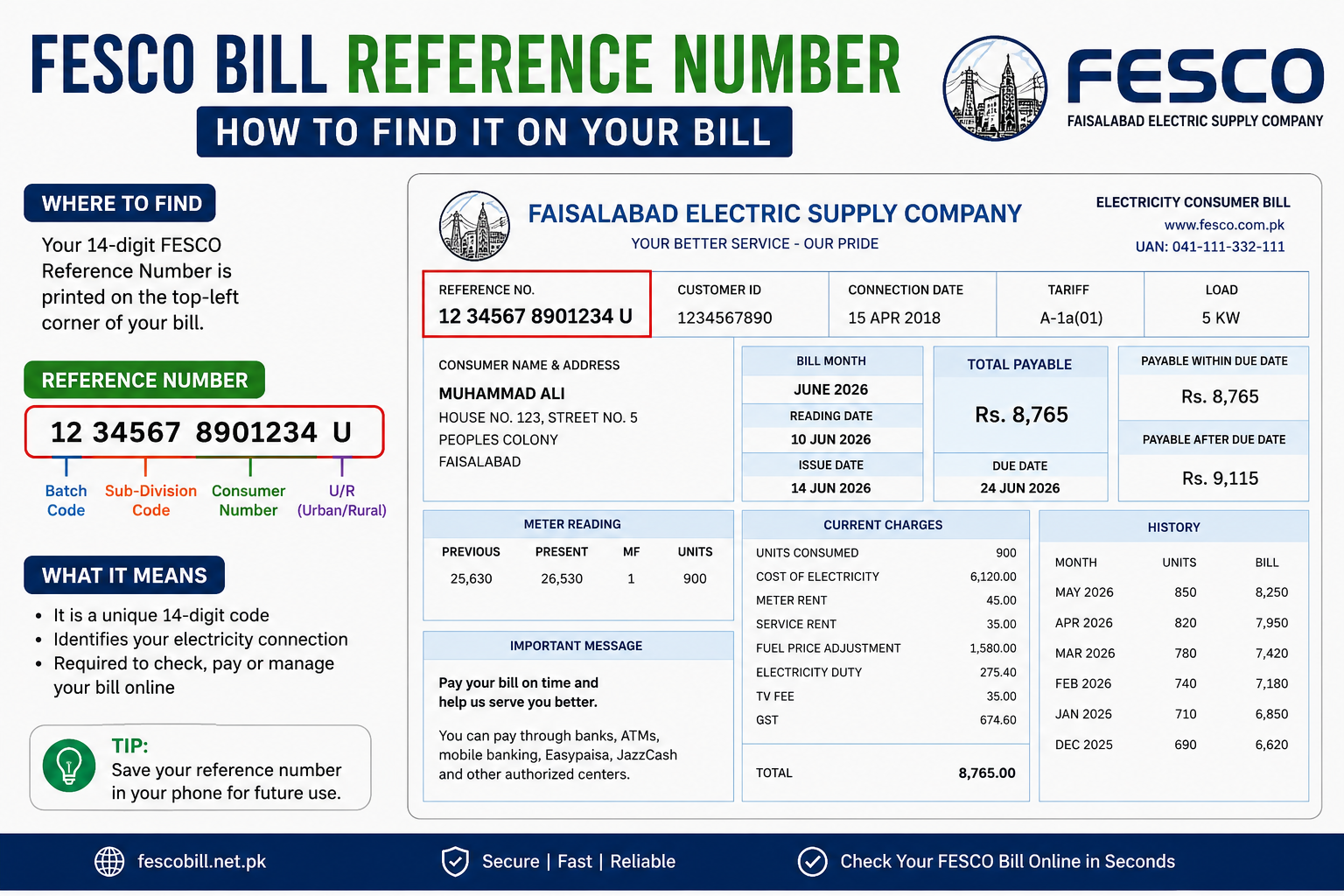
You need just one thing: your 14-digit reference number (or 10-digit Customer ID). It is printed in the top-left corner of any bill — and if you have lost every bill, our reference number recovery guide gets it back in minutes.
- Open the FESCO bill checker on any phone, tablet, or computer.
- Enter your reference number — 14 digits, no spaces, no U/R letter. (The 10-digit Customer ID works equally well.)
- Click “Check Bill.” Your current bill loads within seconds.
- Scroll to the bill history section. The 12-month table appears with months, units, amounts, and payment status.
- Read, compare, screenshot, or save — the data on screen is your official record.
No registration, no fee, no app installation. The entire lookup runs on the reference number alone, which is exactly why we recommend saving that number permanently in your phone.
How to Read Your Bill History Like a Pro
The table is simple; the insights hide in the comparisons. Here is what experienced consumers check:
Compare same months across the seasons. Punjab consumption swings hard with weather — an air-conditioned July can be triple a mild February. The meaningful comparison is July vs the trend of recent months and vs your memory of last July, not July vs March. A summer month that is wildly out of line with the summer pattern is your cue to investigate the meter reading.
Watch for “round number” months. A month billed at a suspiciously round unit figure amid otherwise organic numbers sometimes indicates an estimated (average) reading rather than an actual one — often because the meter reader could not access the meter. Estimated months are frequently followed by a corrective spike. Spotting the pattern early helps you dispute the spike with confidence.
Track the slab effect. Electricity tariffs work in slabs — crossing a threshold (for example, moving above 200 or 300 units) raises the rate on your consumption. If your history shows you hovering just above a slab boundary, small reductions in usage produce outsized savings. To see exactly what a few units mean in rupees, run your numbers through our FESCO bill calculator.
Verify every “Paid” you expect to see. Scan the status column against your own receipts. A month you paid that still shows unpaid needs attention — bank posting delays happen, and our guide on checking whether a FESCO bill is paid or not walks through the exact verification and complaint steps.
How to Download or Print an Old FESCO Bill
Viewing the history answers most questions, but banks, courts, and accountants usually want a document. Any bill still inside the 12-month window can be saved:
- Pull up your bill through the bill checker as above.
- Use the print option (or press Ctrl+P on a computer).
- Choose a connected printer for a paper copy, or select Save as PDF to store a digital copy — the PDF duplicate is accepted for payments and record purposes exactly like the original.
- Name the file clearly (e.g.,
FESCO-March-2026.pdf) and store it in a cloud folder so it survives phone changes.
For device-specific instructions — including saving PDFs on Android and iPhone, and what to do when the print layout looks broken — see our complete FESCO duplicate bill download guide.
Pro habit: every January and July, spend five minutes saving the previous six months as PDFs. Two small sessions a year and you will never again be at the mercy of the rolling 12-month window.
Need Bills Older Than 12 Months? Here’s the Route
The online window stops at 12 months, but FESCO’s internal records go back much further. Your options:
Visit your sub-division office. Bring your CNIC and reference number and request the specific months you need. Older billing records live in FESCO’s internal systems — the staff-side MIS (Management Information System) holds long-term billing and payment records that field offices can consult. (Curious what that internal system is? We explain it in our FESCO MIS guide — including why consumers cannot log into it directly.)
Request records for legal or tax purposes in writing. For court matters, audits, or FBR requirements, submit a written application at the sub-division or revenue office quoting the reference number and the exact months required. Certified copies or ledger printouts are issued for legitimate documented needs.
Reconstruct from your own payment trail. Bank statements, EasyPaisa/JazzCash histories, and stamped receipts together rebuild a surprisingly complete payment record for years back — often enough for tax evidence even without the bills themselves.
Set expectations: retrieving multi-year-old records is a days-not-minutes process and may involve formal requests. For anything within the last year, the online method remains instant and free.
Using Your History to Actually Lower Future Bills
Since you now have 12 months of data in front of you, spend three extra minutes extracting value from it:
- Find your baseline. Your lowest-consumption months (typically Feb–Mar and Oct–Nov) show your non-cooling baseline. Everything above that in summer is cooling load — the single biggest lever you control.
- Estimate your summer premium. Subtract baseline units from peak-month units. That difference, priced through the bill calculator, tells you exactly what your AC season costs — and what an inverter AC or better insulation could save.
- Aim below your slab boundary. If several months sit just above a tariff slab threshold, target the handful of units that would drop you into the cheaper slab. The history table is the scoreboard for that game.
A Worked Example: Reading One Family’s 12-Month History
Abstract advice sticks better with a concrete case. Here is a simplified history for a typical Faisalabad household, and what a careful reader extracts from it:
| Month | Units | Amount (Rs.) | Status |
|---|---|---|---|
| Aug 2025 | 612 | 21,400 | Paid |
| Sep 2025 | 540 | 18,900 | Paid |
| Oct 2025 | 310 | 9,200 | Paid |
| Nov 2025 | 205 | 5,100 | Paid |
| Dec 2025 | 190 | 4,700 | Paid |
| Jan 2026 | 210 | 5,300 | Paid |
| Feb 2026 | 185 | 4,500 | Unpaid |
| Mar 2026 | 200 | 4,900 | Paid |
| Apr 2026 | 350 | 10,800 | Paid |
| May 2026 | 500 | 17,200 | Paid |
| Jun 2026 | 700 | 26,900 | Paid |
Reading 1 — the baseline: Nov–Feb hover around 185–210 units. That is this home’s non-cooling baseline: fridge, fans, lights, motor. Everything above ~200 units in summer is cooling load.
Reading 2 — the summer premium: June’s 700 units minus the 200 baseline = 500 units of pure cooling, at the highest slab rates. Running that delta through the bill calculator prices the AC season precisely — and makes the ROI case for an inverter AC or roof insulation with real numbers instead of guesses.
Reading 3 — the red flag: February shows Unpaid in an otherwise clean year. That is either a posting error (the family paid, the record lags — dispute steps in the paid-or-not guide) or a genuinely forgotten month whose arrears are quietly riding on the current bill. Either way, the table surfaced in one glance what a shoebox of paper bills would have hidden for months.
Reading 4 — the slab check: April’s 350 units sits just above a slab boundary. Trimming 50 units in the shoulder months drops the household into a cheaper slab — the highest-leverage saving visible anywhere in this table.
Five minutes with your own table yields the same four readings. That is the entire skill.
Tenant Move-Out? The 5-Minute History Settlement Checklist
The single most practical use of the history table is the rental handover. Before keys and deposit change hands:
- Pull the 12-month history together — landlord and tenant looking at the same screen kills every “I paid that month” dispute at birth.
- Confirm every month of the tenancy shows Paid; note any unpaid month and settle it from the deposit transparently.
- Download the current duplicate bill and record the closing meter reading photo alongside it.
- Agree in writing (a WhatsApp message counts) on who pays the in-progress month, pro-rated by the reading.
- Landlord saves the history screenshot with the tenancy file — the official record if anything resurfaces later.
Total time: five minutes. Disputes prevented: approximately all of them.
Common Issues When Checking Previous Bills (and Fixes)
“History shows fewer than 12 months.” Newer connections show only the months billed so far. A recent meter replacement or account restructuring can also reset the visible window — your sub-division office holds the earlier records.
“A month is missing or shows zero.” Usually an estimated/merged billing month (common after reader-access problems) where two months were combined. The following month’s bill typically carries the adjustment.
“The history shows someone else’s usage.” You likely moved in during the window; the earlier months belong to the previous occupant of the same connection. The data is correct — it tracks the meter, not the resident.
“Paid month showing unpaid.” Allow 24–72 hours after payment for bank posting. If it persists, keep your receipt and follow the dispute steps in our paid-or-not guide, or contact the FESCO helpline with your reference number and payment proof.
Frequently Asked Questions
How many months of FESCO bill history can I check online? The last 12 billing months, including units consumed, billed amount, and paid/unpaid status for each month. The window rolls forward with every new bill.
Is checking FESCO previous bills free? Yes. Enter your reference number or Customer ID in the bill checker — no registration or fee, on any device.
Can I download a bill from six months ago? Yes. Any month inside the 12-month window can be pulled up and saved as a PDF or printed. Follow the duplicate bill guide for device-specific steps.
How do I get a FESCO bill from two years ago? Visit your sub-division office with your CNIC and reference number, or submit a written request for certified records. Online access is limited to 12 months; older data lives in FESCO’s internal systems.
Does the history show whether each bill was paid? Yes — each month carries a payment status. To resolve a month that shows unpaid despite your payment, see FESCO bill paid or not.
Why does my history include months before I moved in? The history belongs to the connection (reference number), not the resident. Months before your move-in reflect the previous occupant’s usage on the same meter.
Can I check previous bill history with my Customer ID instead of reference number? Yes. Both the 14-digit reference number and 10-digit Customer ID open the same record and the same 12-month history.
Can I use old bills as address proof? Recent bills are widely accepted as address proof by banks and offices. Requirements vary by institution — some want the latest month, others accept any of the last three.
Conclusion
Your FESCO previous bills are not lost paperwork — they are a living 12-month record sitting one reference number away. Check the history online for free, save the months you will need before the rolling window drops them, and use the sub-division office route for anything older. Along the way, that same table quietly shows you where your money goes each season — and where to claw some back.
Pull up your history now: check your FESCO bill online, scroll to the 12-month table, and take two minutes to save this year’s records while they are still in the window.
Frequently Asked Questions (FAQs)
1. How can I check my previous FESCO bill online?
You can check your previous FESCO bills by entering your 14-digit Reference Number or 10-digit Customer ID on a FESCO bill checker. The system displays your current bill along with the last 12 months of bill history.
2. How many months of FESCO bill history can I view online?
FESCO allows you to view your last 12 months of electricity bill history online, including units consumed, bill amount, and payment status.
3. Can I download an old FESCO bill?
Yes. Any bill within the 12-month history can be downloaded as a PDF or printed for payment, record-keeping, or official use.
4. Can I check my previous FESCO bill using a Customer ID?
Yes. Both the 14-digit Reference Number and 10-digit Customer ID provide access to the same bill history and current bill.
5. Does the FESCO bill history show payment status?
Yes. Each monthly bill in the 12-month history includes a Paid or Unpaid status, making it easy to track your payment record.
6. How can I get a FESCO bill older than 12 months?
Bills older than 12 months are not available online. To obtain them, visit your local FESCO sub-division office with your CNIC and Reference Number or submit a written request for older records.
7. Why does my bill history include months before I moved into the property?
The bill history is linked to the electricity connection (Reference Number), not the property owner or tenant. Previous months may belong to the earlier occupant.
8. Is checking FESCO previous bills online free?
Yes. You can check your previous FESCO bills online free of charge using your Reference Number or Customer ID. No registration or app is required.
9. Can I use previous FESCO bills as proof of address?
Yes. Recent FESCO electricity bills are commonly accepted as proof of address by banks, government departments, and other organizations, although requirements may vary.
10. Why is my FESCO bill history showing fewer than 12 months?
This usually happens if your electricity connection is new or has recently been restructured. Earlier records can be obtained from your local FESCO sub-division office if needed.