Last updated: July 2026
If you have ever tried to check your FESCO bill online, you already know the first thing every tool asks for: the reference number. Without it, the system simply cannot find your bill. And yet, this small 14-digit code is the one thing most people cannot locate when they need it — the paper bill is lost, the ink has faded, or the bill never arrived in the first place.
This guide solves that problem permanently. You will learn exactly what the FESCO bill reference number is, where it is printed on your bill, what each part of the number actually means, and — most importantly — six practical ways to recover your reference number even if you do not have a single old bill in the house. By the end, you will never be stuck at the “Enter Reference Number” box again.
What Is a FESCO Bill Reference Number?
The FESCO bill reference number is a unique 14-digit identification code assigned to every electricity connection in the Faisalabad Electric Supply Company (FESCO) network. Think of it as the account number for your electricity meter. Just as your bank account number identifies your account among millions of others, your reference number identifies your specific connection among FESCO’s 5.4 million+ consumers spread across Faisalabad, Sargodha, Jhang, Toba Tek Singh, Chiniot, Mianwali, Bhakkar, and Khushab districts.
Every month, when FESCO’s billing system (managed by PITC — the Power Information Technology Company) generates bills, each bill is tied to a reference number. This is why the number is required for almost everything: checking your bill online, paying through a bank or mobile wallet, subscribing to SMS alerts, registering a complaint, or requesting a bill correction.
One important thing to understand: the reference number belongs to the connection, not the person. If you move into a house with an existing meter, the reference number stays the same — only the registered name changes (through a separate name-change process). This is also why landlords and tenants can both use the same reference number to check the same bill.
Where Is the Reference Number Printed on Your FESCO Bill?
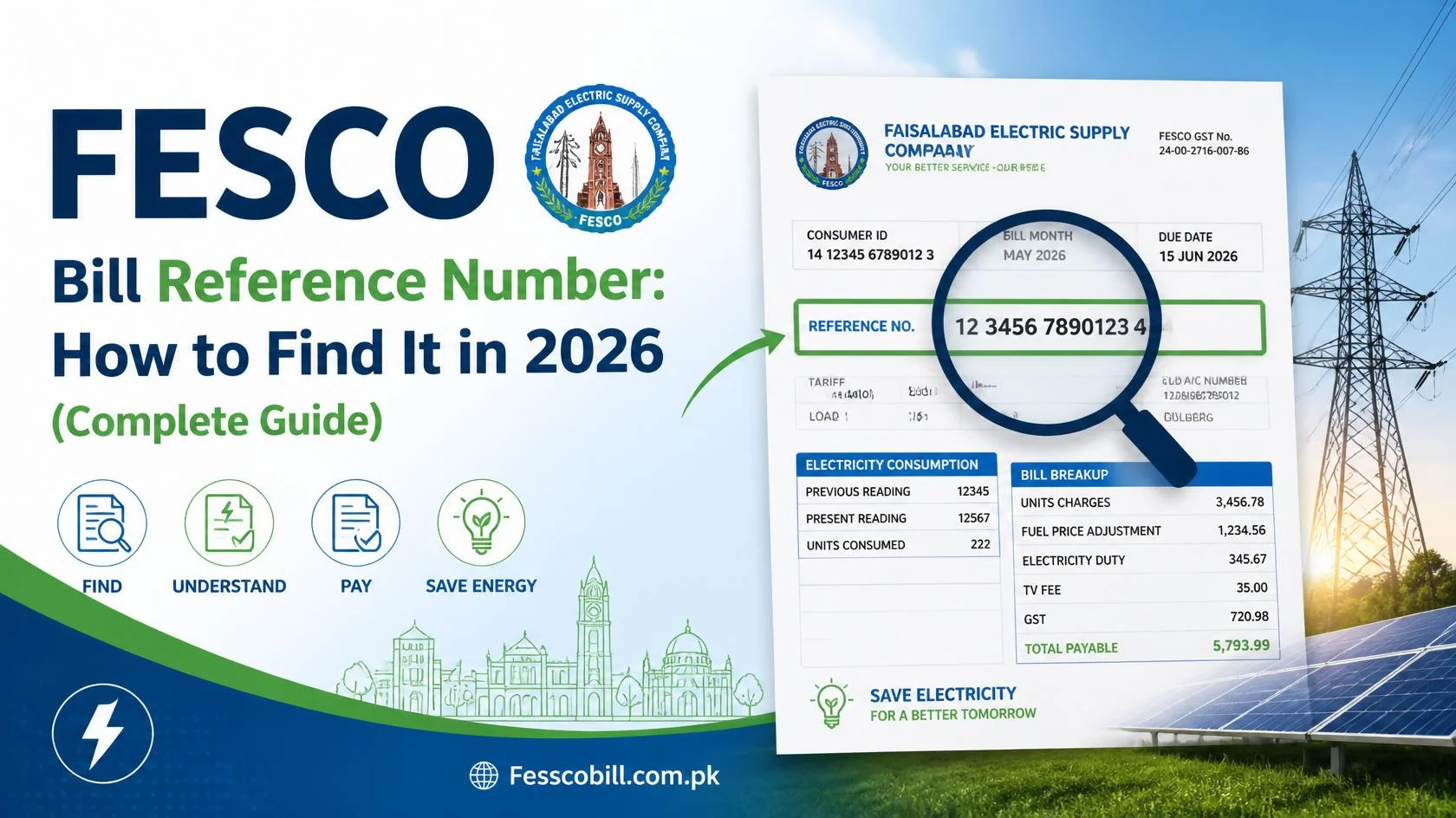
Pick up any FESCO paper bill and look at the top-left corner. That is where the 14-digit reference number is printed on every bill, inside the first block of consumer information. It usually appears alongside your Customer ID, connection date, tariff category, and sanctioned load.
On the printed bill, you will typically see it laid out with small gaps between the digit groups, something like this:
12 34567 8901234 U
The letter at the end (U or R) is part of the identification and indicates whether your connection is Urban (U) or Rural (R).
[IMAGE PLACEHOLDER: Insert a clear photo of a real FESCO bill with the reference number highlighted in a red/blue box in the top-left corner. Add alt text: “FESCO bill reference number location top left corner”]
If you are looking at a duplicate bill that you downloaded online, the reference number appears in the same position, because the online duplicate is generated from the exact same PITC billing record as your paper bill.
FESCO Reference Number Format Explained (What the 14 Digits Mean)
The reference number is not a random string. It is built from three parts that together pinpoint your connection inside FESCO’s system:
| Part | Digits | What It Identifies |
| Batch code | First 2 digits | The billing batch your connection belongs to |
| Sub-division code | Next 5 digits | Your FESCO sub-division (the local office that manages your area) |
| Consumer number | Last 7 digits | Your individual connection within that sub-division |
| U / R suffix | 1 letter | Urban or Rural connection type |
This structure is actually useful to know. For example, the 5-digit sub-division code tells FESCO staff instantly which office handles your area. If you ever visit a FESCO office to recover a lost reference number (covered below), knowing your sub-division — or even just bringing a neighbor’s bill from the same street — helps the staff locate your record much faster, because your neighbor’s bill carries the same sub-division code as yours.
Why Do You Need Your Reference Number? (7 Everyday Uses)
The reference number is the master key to every FESCO service. Here is where you will need it:
- Checking your bill online. Every legitimate bill-checking tool, including our free FESCO bill checker, requires the 14-digit reference number (or Customer ID) to pull your bill from the PITC database.
- Paying through banks and wallets. EasyPaisa, JazzCash, bank apps, and ATMs all ask for the reference number to identify which bill you are paying.
- SMS bill service (8118). FESCO’s SMS service works against your reference number, letting you receive bill details on a basic phone without internet.
- Registering complaints. Whether you call the helpline or use the online CCMS complaint portal, the representative will ask for your reference number first. Keep it ready before you dial — see our FESCO helpline guide for all the numbers.
- Bill corrections. Wrong reading? Inflated units? The correction request is filed against your reference number.
- Downloading a duplicate bill. If your paper bill is lost, the duplicate bill download process starts with this number.
- Name change, load extension, and tariff change applications. All account-level requests reference this number.
In short: memorize it, or at least store it somewhere permanent. We share smart storage tips at the end of this guide.
How to Use Your Reference Number to Check Your FESCO Bill Online
Once you have the number, checking your bill takes less than 30 seconds:
- Open the FESCO bill check tool on our homepage.
- Type your 14-digit reference number in the input box. Enter the digits without spaces — the gaps you see on the paper bill are just for readability.
- Click the Check Bill button.
- Your current bill appears on screen within seconds, showing the payable amount, due date, units consumed, meter reading dates, taxes, and your 12-month payment history.
- From the same screen you can print the bill or save it as a PDF for payment.
That is the entire process. No registration, no login, no fee. The data comes directly from the official PITC billing system, so what you see online matches your paper bill exactly.
Lost Your Bill? 6 Ways to Recover Your FESCO Reference Number
This is the section most readers are here for. You need to check or pay your bill, but you have no old bill and no idea what your reference number is. Here are six recovery methods, ordered from fastest to slowest:
1. Search your phone gallery and WhatsApp
Most people have photographed a bill at least once — to send to a landlord, a tenant, a family member, or an accountant. Search your gallery and WhatsApp media for “bill.” One old photo is all you need; the reference number never changes, so a bill from 2023 carries the same number as this month’s bill.
2. Check your bank or wallet payment history
If you (or anyone in your family) ever paid the bill through EasyPaisa, JazzCash, or a banking app, open the app’s transaction history. Bill payments store the reference number in the transaction details or digital receipt. Many apps also save the biller under “Saved Bills” or “My Bills,” where the full reference number is visible.
3. Find an old paper bill anywhere in the house
Check the usual spots: kitchen drawers, files, the plastic bag of receipts, or the electricity meter box itself — meter readers and previous owners often tuck old bills there. Even a years-old, half-torn bill works if the top-left corner is readable.
4. Call the FESCO helpline
Dial 118 or the toll-free number 0800-66554. Tell the representative you need your reference number, and be ready to verify your identity with your CNIC number, registered name, and complete address. This works well when the connection is registered in your own name. All helpline options are listed on our FESCO helpline page.
5. Visit your FESCO sub-division office
Every area has a local sub-division office (the same office your meter reader reports to). Bring your original CNIC and, if possible, any property document or a neighbor’s bill from the same street. The staff can look up your connection in their system and give you the reference number on the spot. This is the most reliable method for connections registered under a deceased relative or previous owner’s name.
6. Ask your meter reader or a neighbor
Your area’s meter reader visits every month and can identify your connection from the meter itself. Alternatively, a neighbor’s bill shares your batch and sub-division codes — the first 7 digits — which narrows things down considerably when you visit the office.
If none of these work because the connection details are tangled (for example, an old rural connection under a grandparent’s name), read our detailed guide on checking your FESCO bill by CNIC or meter number — it explains exactly what FESCO offices can and cannot look up.
Reference Number vs Customer ID: Quick Clarification
Right next to the reference number on your bill, you will see another code: the 10-digit Customer ID. Both numbers identify your connection, and most online tools (including ours) accept either one. The practical difference:
- Reference number (14 digits): the primary billing identifier; required for bank payments, SMS service, and complaints.
- Customer ID (10 digits): a shorter account identifier; handy for online bill checking when the reference number is unreadable.
The two numbers are frequently confused, and entering one in the other’s field is the most common cause of “Bill Not Found” errors. We have written a full comparison — FESCO Customer ID vs Reference Number — that shows exactly where each is printed and when to use which.
Common Errors When Entering Your Reference Number (and How to Fix Them)
Even with the correct number in hand, small entry mistakes produce a “Bill Not Found” message. Here are the errors we see most often:
Typing the spaces. The paper bill shows the number in groups (12 34567 8901234). Online tools expect one continuous string of 14 digits. Remove all spaces.
Including the U/R letter in a digits-only field. Some tools want only the 14 digits; the Urban/Rural letter is not typed. If a tool rejects your number, try again without the letter.
Mixing up 1 and 7, or 0 and 8, on faded print. Thermal-printed bills fade fast in heat. If a digit is ambiguous, try the alternatives, or confirm the number using method 2 or 4 above.
Using an outdated number after a meter change or reconnection. In rare cases — meter replacement, connection transfer, or sub-division restructuring — a new reference number is issued. If your old number suddenly stops working, contact your sub-division office to confirm whether the number changed.
Checking too early in the billing cycle. If your bill for the current month has not been generated yet, the tool may show the previous month or no bill at all. This is not a number error — the bill simply is not issued yet. Our guide on what to do when your FESCO bill is not received covers billing-cycle timing in detail.
Keep It Safe: 4 Smart Ways to Store Your Reference Number
Recovering a lost number once is educational; doing it every month is painful. Take two minutes now:
- Save it as a contact in your phone, named “FESCO Bill – Home,” with the 14 digits in the number field or notes.
- Save the biller in your banking or wallet app. After one payment, mark FESCO as a saved biller — the app remembers the reference number forever.
- Photograph the top-left corner of your current bill and add it to a “Documents” album or your favorites.
- Write it inside your main CNIC wallet slot or a family register — the low-tech backup that survives phone changes.
One Person, Many Connections? Managing Multiple Reference Numbers
Plenty of families juggle several connections — the house, the shop, a rented-out upper portion, a tube well in the village. Each connection carries its own independent 14-digit reference number, and mixing them up leads to the classic blunder: paying the shop’s bill twice while the house bill quietly crosses its due date. The clean system: save each number as a separate labeled contact (“FESCO – Shop”, “FESCO – Ghar”, “FESCO – Tube Well”), save each as a separate biller in your wallet app, and check them together on one fixed date each month through the bill checker. Thirty seconds per number, zero mix-ups, and every due date caught in a single sitting.
Frequently Asked Questions
How many digits is the FESCO reference number? It is 14 digits, followed by a U (Urban) or R (Rural) letter on the printed bill. When checking your bill online, enter the 14 digits without spaces.
Where exactly is the reference number on the FESCO bill? In the top-left corner of the bill, within the first block of consumer details, usually directly beside or above the 10-digit Customer ID.
Can I check my FESCO bill without a reference number? Online tools require either the reference number or the Customer ID. If you have neither, you can recover the number via the helpline (118), your bank app’s payment history, or your sub-division office — full alternatives are in our CNIC and meter number guide.
Does the reference number change every month? No. The reference number is permanent for the life of the connection. Only the bill amount and billing month change. It may change only in rare cases such as meter replacement or connection restructuring.
Is the reference number the same as the meter number? No. The meter number is the serial number stamped on your physical meter by the manufacturer. The reference number is a billing account code created by FESCO. Online bill tools accept only the reference number or Customer ID, not the meter serial.
Can two houses have the same reference number? Never. Each connection has a unique reference number. If two properties share one meter (one connection), they share one reference number and one bill.
What should I do if my reference number shows someone else’s name? The connection is still registered under a previous owner or relative. The bill remains valid and payable. To update the name, apply for a change of name at your sub-division office with your ownership documents and CNIC.
Is it safe to share my reference number? Sharing it carries low risk — anyone with the number can only view or pay your bill, not modify the account. Still, avoid posting it publicly, since bill details reveal your address and consumption pattern.
Conclusion
Your FESCO bill reference number is a 14-digit permanent code printed in the top-left corner of every bill — and it is the key to checking, downloading, and paying your electricity bill online. If you ever lose it, your phone gallery, wallet-app history, the 118 helpline, and your sub-division office can all recover it within minutes.
Have your reference number ready? Check your FESCO bill online now — enter the 14 digits, click Check Bill, and your complete bill with due date and payment history appears in seconds, free of charge.